

How do you keep track of your “perfect audio combination”?
Earphones, headphones, DACs, amps, custom cables, and eartips… The world of portable audio is incredibly fun because the sound signature changes drastically depending on the gear you combine.
But are you just jotting down these personal “perfect combinations (signal chains)” and your sound impressions in your phone’s default notes app or random social media posts?
As a portable audio enthusiast myself, I love trying out different gear combinations. However, I often found myself forgetting what a specific setup sounded like down the road. On top of that, looking up gear specs online every time was a hassle, and I really wanted a way to beautifully record and share my own collection.
Driven by this personal desire of “I wish an app like this existed,” I developed the Android app AudioRig – Blueprint Specs.
With this app, you can build a database of your owned gear, graphically assemble your connection order (signal chain), and record your daily listening experiences as a diary alongside detailed sound evaluations.
I would love for fellow audio enthusiasts to give it a try, so let me introduce its key features and what I focused on during development!
- My Design Focus 1: Solving the Hassle of Entering Specs with AI!
- My Design Focus 2: A Visual “Signal Chain Editor” for Gear Connections
- My Design Focus 3: Graphing Intangible Sound Characteristics with “3 Sound Evaluation Sliders”
- My Design Focus 4: Share Your Pride and Joy on Social Media! “Blueprint-style Infographic” Generation
- About “AudioRig Pro”
- Conclusion: Give it a try!
My Design Focus 1: Solving the Hassle of Entering Specs with AI!
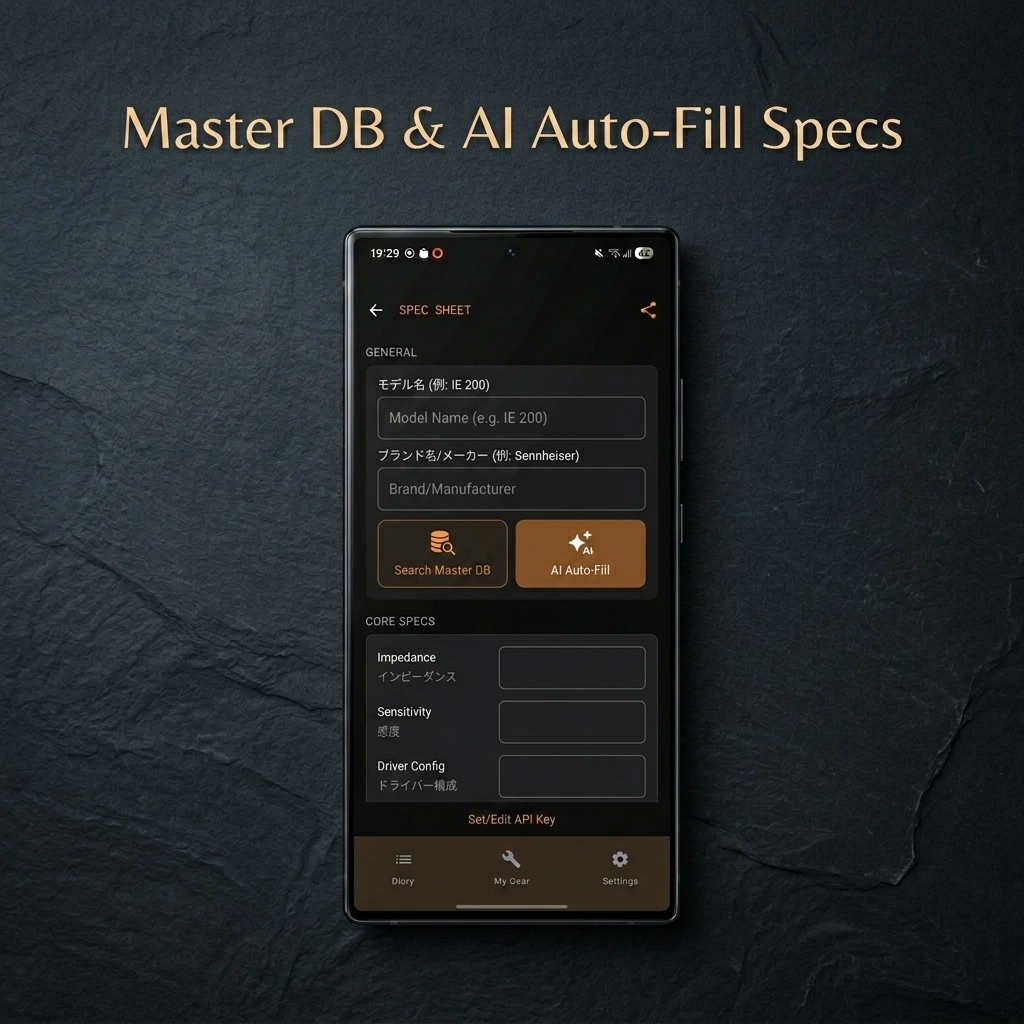
When registering gear in an app, searching manufacturer sites and manually typing details like “What was the impedance again?” or “Which DAC chip does this use?” is incredibly tedious.
To solve this, I equipped the app with an “Auto-Fill Specs via AI” feature powered by Gemini AI.
How It Works
- Select the gear category (Earphones, DAC/Amp, Cable, Eartips, or Audio Source).
- Simply enter the model name and brand/manufacturer (optional), then tap “Fetch via AI.”
- Gemini AI will automatically search the web (using Google Search grounding) for official specifications and seamlessly auto-fill the input fields for you.
Users Register and Use Their Own AI API Keys
Initially, I considered integrating the AI API cost directly into the app’s price structure. However, this would have forced a subscription-based (recurring fee) model to cover API usage costs. To avoid this and keep the app budget-friendly, I decided to let users obtain their own Google AI Studio API key and register it in the app to use within Google’s free tier.
Since not everyone will need the AI auto-fill feature, making it an optional, user-configured setting felt like the most user-friendly approach.
My Design Focus 2: A Visual “Signal Chain Editor” for Gear Connections
Once your gear is registered, you can connect them intuitively in the editor screen.
Starting from the source (smartphone or DAP) through the DAC/amp, cable, and down to the earphones and eartips, the entire signal path is visualized—much like designing a guitar effects pedalboard.
I designed this Material Design UI to be clean and engaging, bringing back the joy of assembling your own custom “Rig” (which is where the name “AudioRig” comes from) every time you decide what setup to listen to today.
My Design Focus 3: Graphing Intangible Sound Characteristics with “3 Sound Evaluation Sliders”
After listening to your connected setup, you can record your impressions of that specific combination.
In addition to a general 5-star rating, I created three detailed sound character sliders to visually map out your perception of the sound signature:
- Frequency Balance (V-shaped / Bass & Treble Boost ─── Mid-centric / Flat)
- Sound Texture (Warm ─── Cool)
- Soundstage / Distance (Intimate ─── Expansive)
These 5-step sliders allow you to intuitively log subtle sound nuances that are difficult to put into words.
You can also record the “Reference Track” (song title and artist) used for the evaluation, along with detailed “Impressions” (text notes). Over time, this builds a personalized “sound chart” archive, helping you remember exactly how a setup performed (e.g., “Highs were crisp without piercing on this track”).
My Design Focus 4: Share Your Pride and Joy on Social Media! “Blueprint-style Infographic” Generation
Why not share your favorite setups and sound evaluations on social media like X (formerly Twitter)?
With AudioRig – Blueprint Specs, you can automatically render and export high-resolution, catalog-style images directly on your device.
The generated image beautifully displays your connection flow (complete with connection labels like digital, 4.4mm balanced, 2PIN, etc.), detailed specs, the sound signature rating graphs, and your reference track information—styled like a clean engineering blueprint.
You can choose from three distinct themes:
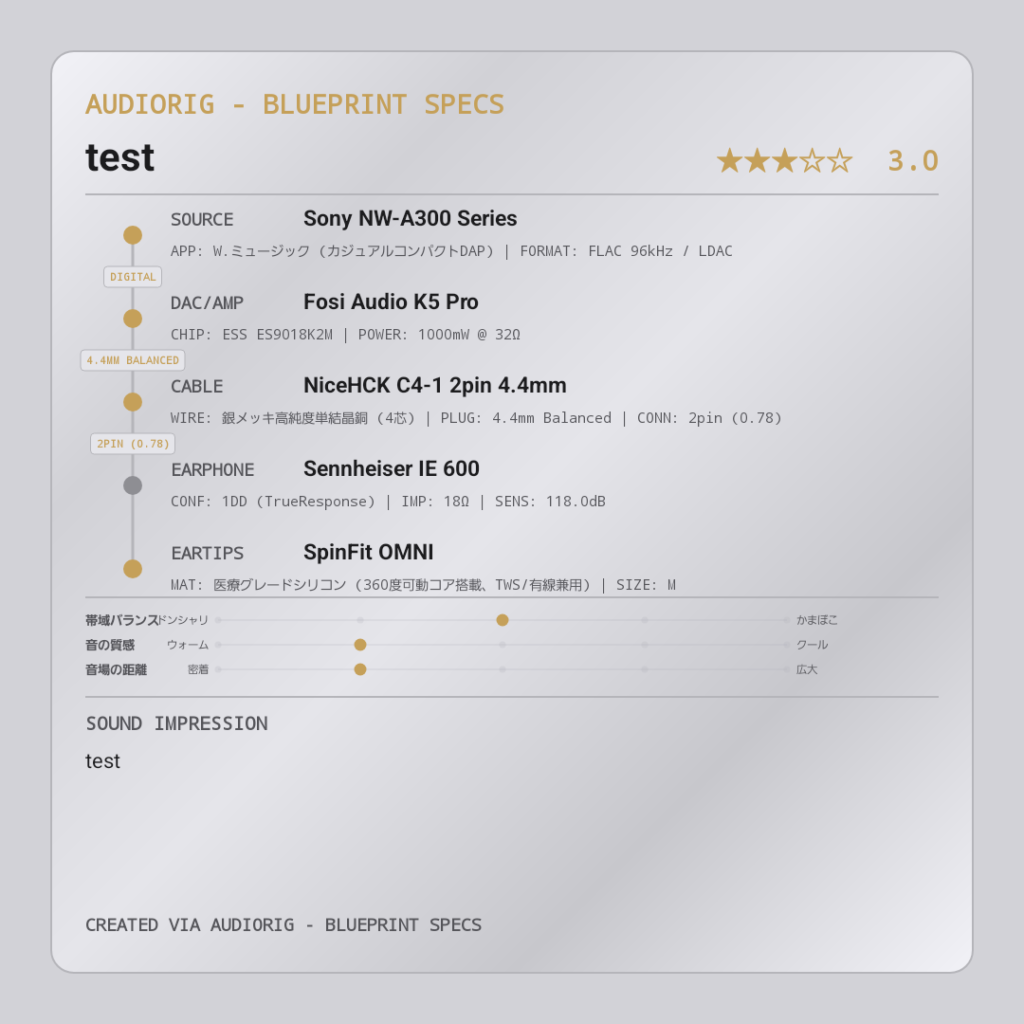
- CYBER DARK
A futuristic cyberpunk theme featuring vivid neon orange and cyan accents on a jet-black background.
- BRUSHED METAL
A premium champagne gold theme reminiscent of a heavy aluminum/magnesium faceplate found on high-end audio gear.
- MONOCHROME STUDIO
A minimalist, professional studio-style theme that strips away distraction, focusing purely on black-and-white contrast.
About “AudioRig Pro”
You can try out the core features of AudioRig – Blueprint Specs completely free. However, to support the ongoing development and maintenance of the app, I have implemented a one-time purchase premium option.
If you enjoy the app, I would be incredibly grateful for your support to help keep the project alive.
Security Note: API Keys are Stored Safely on Your Device
Sensitive data, including the Gemini API key used for the auto-fill feature, is stored exclusively in a secure local area on your device, never on a developer-side server. You can use the app with complete peace of mind.
Since it is not a subscription, a single payment unlocks all premium features (AudioRig Pro) forever. There are absolutely no annoying ads.
Conclusion: Give it a try!
I created AudioRig – Blueprint Specs with the hope of making the daily listening experience more enjoyable and organized for portable audio lovers.
- You want to organize and manage your collection of multiple earphones, DAPs, and cables (your Rigs).
- You want to keep a sensory and objective record of how the sound changes when switching cables or eartips.
- You want to share your setups and sound impressions in a beautiful, graphic format on social media.
If any of these sound like you, please download the app and give it a try!
I look forward to hearing your feedback!
【App Overview】
* App Name: AudioRig – Blueprint Specs
* Supported OS: Android
* Price: Free to download (Premium features unlocked via a one-time purchase for “AudioRig Pro”)