
👉 日本語版はこちら(Japanese version of this article is available here).
Do you have old family videos or nostalgic WMV files sitting deep in your hard drive, collected years ago?
While organizing my old hard drives, I found a massive collection of family videos and old favorites.
However, when I tried to watch them, manually opening them one-by-one in a player was tedious. On top of that, some formats were too old to play. Batch encoding all of them to MP4 was out of the question—it would take far too much time and CPU power.
So, I decided to build my own custom desktop video player called “LocalCast” using Electron and FFmpeg.
If you’ve been looking for something similar, I am releasing the app for free. Feel free to download and use it!
A Familiar “YouTube-Like” Layout and Handy Features
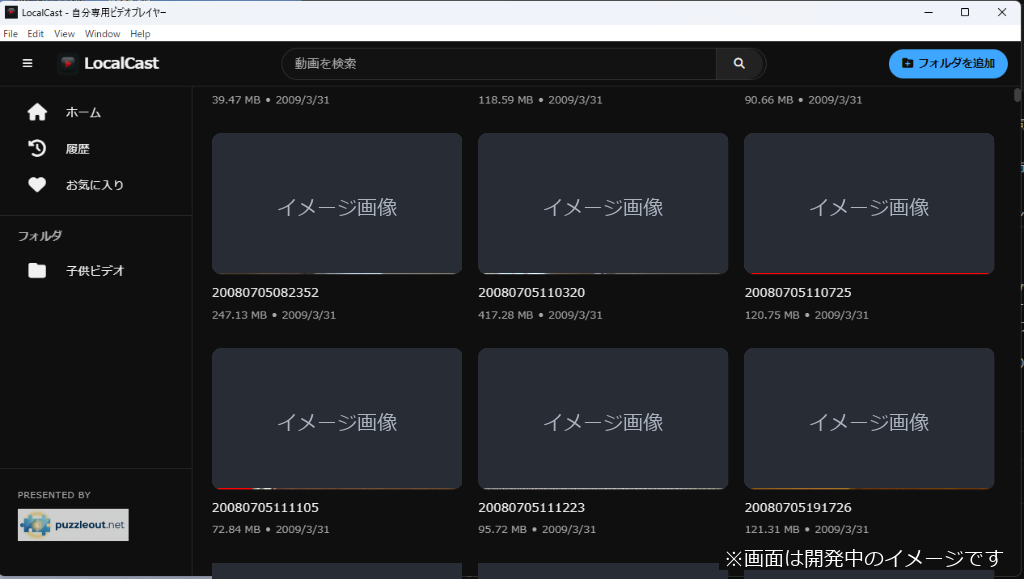
Since I wanted to use this player daily, I designed the user interface to be as intuitive as possible, mimicking the familiar 2-column layout of YouTube.
It features a large video player on the left and a “Next Videos” playlist (video files in the same directory) on the right.
Just select a folder, and the app automatically scans all subfolders and populates the list with thumbnails, just like YouTube. It feels like having your own private streaming service.
I also packed it with the following handy features:
- One-Click Favorites: Bookmark your favorite videos with one click and access them anytime from the sidebar.
- Playback History & Auto-Resume: If you stop watching halfway through, the app automatically resumes from where you left off (stored safely locally via IndexedDB).
- Smart Thumbnail Extraction: FFmpeg automatically extracts a preview image from the 2-second (or 0-second) mark of each video to generate clean thumbnails.
Supports Google Drive Videos
If you want to manage videos stored on Google Drive using LocalCast, you can do so by using “Google Drive for Desktop” to sync your files locally. This allows you to select synced folders directly in the app.
Note: As of June 2026, videos in Google Photos do not sync directly with Google Drive, so you will need to manually copy those videos to your Google Drive folder first.
【Free Download】Secure, Admin-Free Installation
To help anyone struggling with massive video collections or stubborn old formats, I am releasing “LocalCast” for free!
For the latest version and update history, please visit the
GitHub Releases (Latest) page.
A Windows installer is ready. If you are a video collector, please give it a try.
Peace of Mind: No Administrator Privileges Required
If you are hesitant about installing custom desktop tools due to security policies or lack administrator passwords on a shared PC, don’t worry.
The LocalCast installer is designed for User-level installation, requiring no UAC (Administrator) prompts. It installs directly into your user profile (AppData), keeping the system directory clean. Both installation and uninstallation are extremely safe and simple.
Additionally, the FFmpeg binary is packaged directly inside the application. You don’t need to manually download FFmpeg or set up environment variables. Just run the installer and you’re good to go!
Conclusion
Re-encoding terabytes of video files to MP4 takes days of computing power and electricity. That is why LocalCast’s on-demand approach—converting only what you watch, exactly when you watch it—is so practical and efficient.
Experience the convenience of reviewing your old video collection with a YouTube-like interface!